Ollie has closed.
Your family’s week still needs someone keeping track.
Ollie shut down on November 6, 2026. If it was how you kept the school email, the calendar and the to-dos straight, here’s an honest look at what FamGlow takes over, what it doesn’t, and how to switch in about 15 minutes.
On iPhone, get FamGlow on the App Store.
The short answer
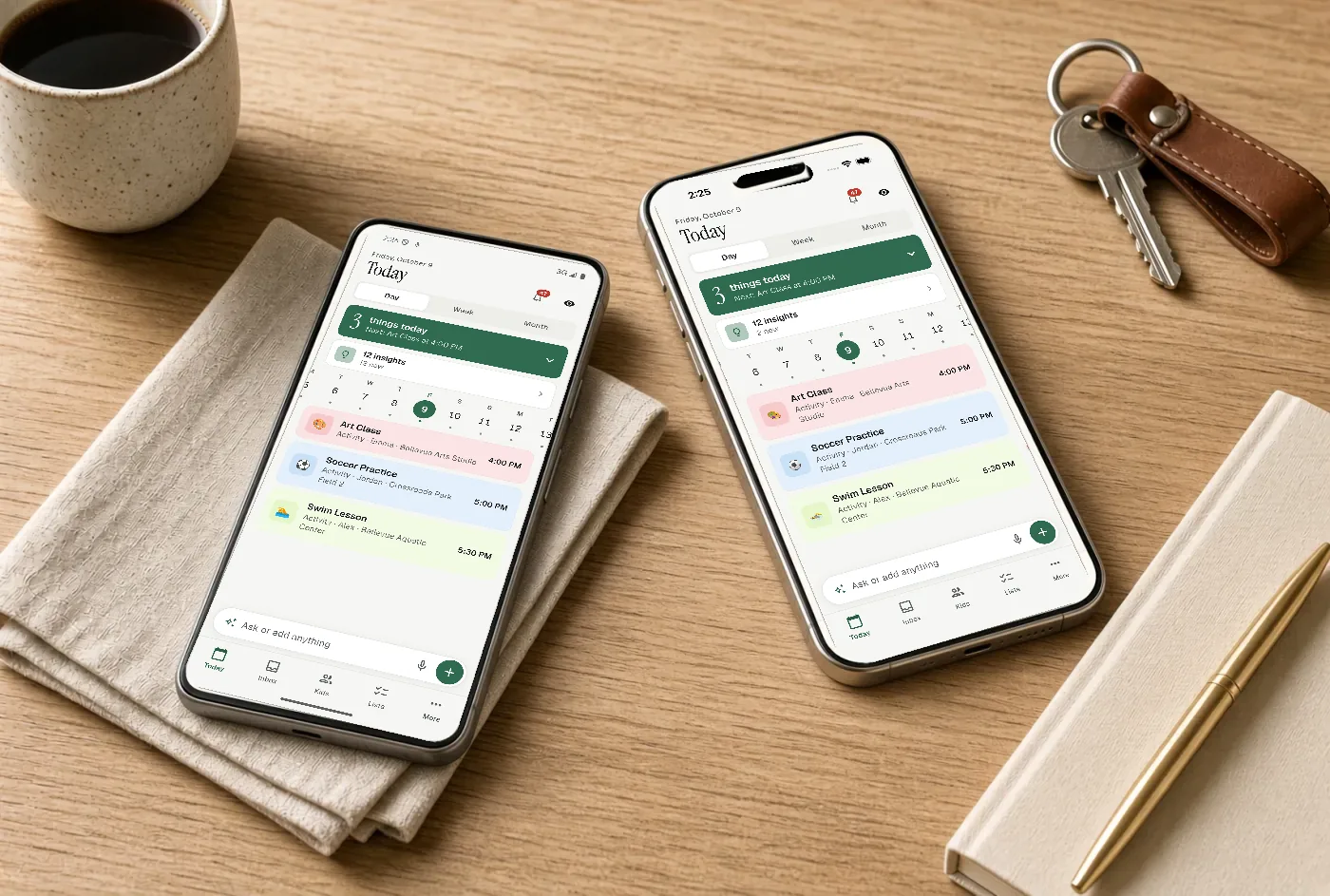
Ollie, the family AI assistant, shut down on November 6, 2026. FamGlow is an Ollie alternative for families who used Ollie to keep the calendar, the school email and the lists straight. Both parents share one family, forwarded school email turns into events you approve, and you can add to shopping lists by voice. FamGlow is on iPhone, Android and the web, and switching takes about 15 minutes. It doesn’t plan meals or order groceries.
First: what’s safe, and what to tidy up
- Anything already on your Google or Apple Calendar belongs to you, not to Ollie. It’s still there.
- If Ollie sent you an export of your data, save it somewhere you’ll find it again.
- Ollie had access to your email and calendar. Remove that access in your Google or Microsoft account settings, under connected apps.
- For a refund of an unused subscription, check Ollie’s farewell message.
The Ollie alternative for your family’s calendar, email and lists
- The school email, handled. Your family gets its own private FamGlow address. Forward the email about picture day and the dates come back as something to approve, not another thing to read. Mail from a sender you haven’t approved is held back and never shown to the AI until you release it.
- One calendar for the whole family. Google Calendar, Apple iCloud, and school or team calendar links in one week, on every phone.
- Say it once. Type it or say it, in the language you speak at home. Items land on the right store’s shopping list, and anyone crossing one off updates every phone.
- Ask and get a straight answer. “What’s happening this week?” is answered from your family’s real schedule. When two things clash, FamGlow names who it affects, suggests a fix, and leaves the decision to you.
- It remembers what you told it. “Mrs Chen teaches piano on Tuesdays.” FamGlow stores family facts word for word and repeats them back exactly as you said them.
- Paper, too. Photograph the practice schedule or the camp flyer, and FamGlow turns it into events for you to review before anything is saved.
Where FamGlow goes further than Ollie
- It never needs your inbox. Ollie connected to your email account. FamGlow never asks to read your inbox. You forward only the emails you want it to see.
- Nothing changes without your yes. Ollie could book and pay on your behalf. FamGlow shows you what it understood and why, then waits for your approval before your family’s plan changes.
- Made for two parents. Both parents share one family. Each pickup and drop-off has a parent assigned, and that parent is the one who gets the reminder.
- Your calendars stay yours. FamGlow reads Google and Apple calendars and never changes the events already on them.
- On the wall, too. Open FamGlow on a tablet you already own and the family’s week sits in the kitchen, where the kids can see it.
What we don’t do
- Meal planning, recipes and grocery ordering. If meals were your main reason for Ollie, a dedicated meal planner will serve you better today.
- Booking appointments and paying bills. FamGlow keeps track of them. It doesn’t make them for you.
- A texting assistant. You use FamGlow in its app or in a browser, not by text message.
We’d rather tell you now than after you’ve moved.
What FamGlow costs
FamGlow is free for a limited time. Every new family gets 90 days of Premium free, with no card. After that, keep the free tier, which has no time limit, or pick Family at $3.99 a month or Premium at $6.99 a month in the FamGlow app. There are no ads on any tier, and we never sell your family’s information. See what each plan includes.
How to switch from Ollie in about 15 minutes
- Sign in at app.famglow.com or in the FamGlow app for Android or iPhone, with Google or Apple. No new password.
- Connect your calendars. Google and Apple sync directly. School and team calendars come in through their calendar links.
- Invite your partner. FamGlow works best when both parents see the same week.
- Add the kids and their activities. Each child gets their own color.
- Bring the rest across. Forward the next school email to your FamGlow address, snap any paper schedules, and say your standing shopping items out loud in one go.
Private by design
Ollie’s families picked it for privacy, so here’s ours in plain terms. No ads, and we never sell your family’s information. FamGlow reads the calendars you connect and never changes the events on them. Your photo frame pictures are never sent to AI. When you ask FamGlow to read a flyer or a forwarded email, that item goes to our AI provider to be turned into events, and it’s never used to train their models. You can delete your account from Settings, with no email and no waiting period. The details are in our privacy policy.
Ollie alternative: questions, answered
Did Ollie shut down?
Yes. Ollie’s CEO announced the closure on October 30, 2026, and the app shut down on November 6, 2026.
What’s a good Ollie alternative?
It depends on what you used Ollie for. If it kept your family’s calendar, school email and to-dos straight, FamGlow covers that, with both parents in the same family. If meal planning was your main reason for Ollie, a dedicated meal planner is a better fit, because FamGlow doesn’t plan meals.
Can I import my Ollie data into FamGlow?
There’s no direct Ollie importer. Most of a family’s schedule lives in Google or Apple Calendar, which FamGlow syncs directly. For everything else, forward emails to your FamGlow address or photograph paper schedules, and you review each item before it’s saved.
Which Ollie alternative works for both parents?
FamGlow is built for two parents in one family. Both see the same week, each pickup and drop-off can be assigned to a parent, and that parent is the one who gets the reminder.
How long does it take to switch from Ollie to FamGlow?
About 15 minutes. Sign in with Google or Apple, connect your calendars, invite your partner, add the kids and their activities, then forward the next school email to your family’s FamGlow address.
Is FamGlow free?
FamGlow is free for a limited time: every new family gets 90 days of Premium free, with no card required. After that, the free tier has no time limit, and paid plans are Family $3.99 and Premium $6.99 per month. There are no ads on any tier.
Does it work on iPhone?
Yes. FamGlow is on the App Store for iPhone, and there’s also a FamGlow app for Android on Google Play.
Can I text FamGlow like I texted Ollie?
Not today. You use FamGlow in its app or in a browser, and you can add things by voice or by typing.
Ollie shutdown: announced by Ollie’s CEO on October 30, 2026, with the app closing November 6, 2026, as reported by TechCrunch. Details current as of November 12, 2026. FamGlow is not affiliated with Ollie.
Also leaving Maple? Here’s how to move a Maple family to FamGlow. Comparing more options? See how FamGlow compares to Nori, Skylight and Cozyla, or read our guide to digital family calendars.
Pick up where Ollie left off.
Free for a limited time: 90 days of Premium, no card required. No ads.
Try FamGlow FreeNo card required. Works in any browser, in the FamGlow app for iPhone, and in the FamGlow app for Android.